
What if a blank thermostat after a power outage doesn’t mean the HVAC system is broken? If you’re searching for “thermostat not working after power outage Orlando,” it’s understandable to worry when the screen stays dark or your AC doesn’t restart. But a few safe checks may help you narrow down the cause before assuming there’s a major problem.
Start with the basics: confirm power has been restored, check the thermostat’s batteries if it uses them, and make sure its mode and temperature settings are correct. Waiting about 30 minutes after power returns can also give the system time to reset. You don’t need to open equipment or handle wiring to check these items.
This guide explains what you can safely try, what warning signs mean it’s time to stop troubleshooting, and when the issue may point to the HVAC system rather than the thermostat. If basic checks don’t restore operation, a qualified HVAC professional can diagnose the problem and help you understand the next step. For Orlando homeowners, knowing where to draw that line can help protect both your home and your peace of mind.
Key Takeaways
- A blank, frozen, or responsive thermostat can point to different issues, so note exactly what it’s doing before troubleshooting.
- If your thermostat not working after power outage Orlando search brought you here, start with safe checks and avoid opening equipment or handling wiring.
- Check the labeled breaker once; if it trips again, stop and leave further investigation to a professional.
- Burning odors or visible damage are reasons to stop troubleshooting and seek qualified help.
- If basic checks don’t restore operation, an HVAC professional can assess the thermostat and the connected system controls.
Thermostat Not Working After a Power Outage in Orlando: Start With These Symptoms
A power outage can interrupt power to a thermostat or disrupt normal HVAC operation. If you’re searching for “thermostat not working after power outage Orlando,” start by noticing what the thermostat and system are doing. These clues can help describe the issue, but they can’t confirm whether the cause is the thermostat, its power supply, or the HVAC equipment.
A thermostat acts as a control between your preferred temperature and the heating or cooling system. The Thermostat overview explains this basic function. After an outage, separate a display problem from a system that isn’t responding to a thermostat that appears to work.
- Blank screen: The display shows nothing. Depending on the thermostat, possible causes include depleted batteries or interrupted power. A blank screen alone doesn’t prove the thermostat has failed.
- Frozen or unresponsive display: The screen may be lit, but buttons or controls don’t respond. Note whether the display is stuck on one reading or setting.
- Unexpected settings: The thermostat works, but its mode or temperature setting may not match what you remember.
- Responsive thermostat, idle system: The display and controls work, but the AC or heat pump doesn’t start when you adjust the setting.
What a blank or unresponsive thermostat can tell you
A dark screen narrows down what to observe, but it doesn’t identify a failed component. Some thermostats use batteries, while others depend on power from the HVAC system, so the possible explanation depends on the model. If you’re considering a reset, check the user manual first and follow only the instructions for your specific thermostat. Avoid guessing at reset steps.
When the thermostat works but the HVAC system does not
If the screen responds and the settings look right but heating or cooling won’t start, the controls and equipment may need separate assessment. The thermostat may be functioning while another part of the system isn’t responding. A professional can evaluate thermostat operation and the connected HVAC controls rather than relying on symptoms alone.
Keep your checks to what you can see and operate normally. Don’t remove thermostat or HVAC equipment panels, and don’t touch exposed wiring. Stop if you notice a burning smell, visible damage, or a breaker that trips again. Those signs call for professional help, not more troubleshooting.
Why an Orlando Thermostat May Stop Working After Power Returns
Power coming back doesn’t always mean every part of your heating and cooling system has restarted normally. A thermostat may lose power or settings, while a breaker or HVAC control issue may keep equipment from responding. These are possibilities, not a diagnosis: the same symptom can have more than one cause. If you’re dealing with a thermostat not working after power outage Orlando homeowners may find it helpful to check simple, visible clues before deciding what to do next.
Thermostat power, batteries, and settings
Battery-powered and hardwired thermostats can respond differently to an outage. If the display is blank, check whether your model has a battery indicator or uses replaceable batteries. Replace them only if the user manual supports that step. A hardwired thermostat may lose its power source even if it has no batteries.
A reset may also affect settings. Look at the display and confirm the thermostat is set to the intended mode, such as cooling or heating, and that the set temperature calls for the system to run. Check the schedule and clock, too. A changed time or schedule can make it seem as though the system isn’t responding when it’s following settings you didn’t expect.
HVAC breakers, controls, and system startup
Some systems have separate breakers for equipment such as the indoor air handler and outdoor unit. A breaker serving the thermostat or HVAC controls may also affect operation. If the labeled breaker appears tripped, that may be one clue, but it doesn’t confirm what caused the interruption. Angi’s guidance on a tripped circuit breaker offers additional context on this common post-outage concern.
Check only the labels and breaker switches you can access safely. Don’t remove the electrical panel cover or touch wiring. If a breaker trips again after being reset, don’t keep resetting it. Repeated trips can signal an issue that needs qualified assessment.
- Blank thermostat: Interrupted power or depleted batteries may be possibilities, depending on the model.
- Settings look different: A reset may have changed the mode, temperature, schedule, or clock.
- Thermostat responds, but equipment stays off: A breaker, control, or HVAC startup issue may be involved.
Because the thermostat and connected equipment depend on more than one control, a visible setting or breaker may not reveal the root cause. If basic observations don’t clarify why the system isn’t running, AC and heating repair from a qualified HVAC professional can help determine whether the issue lies with thermostat operation or connected system controls.
DIY Thermostat Checks vs. Professional HVAC Diagnosis
Not every thermostat problem calls for immediate service, but safe checks have a clear limit. If you’re searching for “thermostat not working after power outage Orlando,” use the display and system behavior to decide what you can check yourself and when to stop. Keep your checks to the thermostat’s normal controls, applicable batteries, and a labeled breaker you can access safely.
| Homeowner-safe check | What it can clarify | When to stop |
|---|---|---|
| Confirm the thermostat’s mode, set temperature, schedule, clock, and display status. | Whether changed settings or a schedule may be preventing a heating or cooling call. | If settings won’t stay in place or the screen remains blank after other safe checks. |
| Check or replace thermostat batteries only if the model uses them and the manual supports it. | Whether depleted batteries may explain a dim or blank display. | If the display still doesn’t respond or you’re unsure how the model is powered. |
| Check the labeled HVAC breaker once, only if it’s safely accessible. Don’t remove the panel cover. | Whether a tripped breaker may be interrupting power to system equipment. | If it trips again, or you notice burning odors, visible damage, or other unusual electrical signs. |
After confirming the settings, allow the system to restart according to the thermostat or HVAC manufacturer’s instructions. Don’t assume a universal wait time. Angi’s guide to troubleshooting HVAC after a power outage discusses issues such as breaker interruptions and system startup delays, but your equipment’s own guidance should take priority.
Calling for help isn’t premature if safe checks don’t restore normal operation. A display that stays blank, settings that won’t hold, or a thermostat that responds while the equipment remains inactive may point to an issue beyond basic settings or batteries. Repeated breaker trips and signs of electrical trouble are clear reasons to stop, not to keep testing.
Leave wiring, control boards, voltage testing, and inspection inside HVAC equipment panels to a qualified HVAC professional. These checks require appropriate training and tools. A technician can assess whether the thermostat is communicating properly and examine connected system components to narrow down why heating or cooling hasn’t resumed. That diagnosis helps distinguish a thermostat concern from an equipment-side problem without asking you to take electrical risks.
Fixing Your Thermostat After an Orlando Power Outage
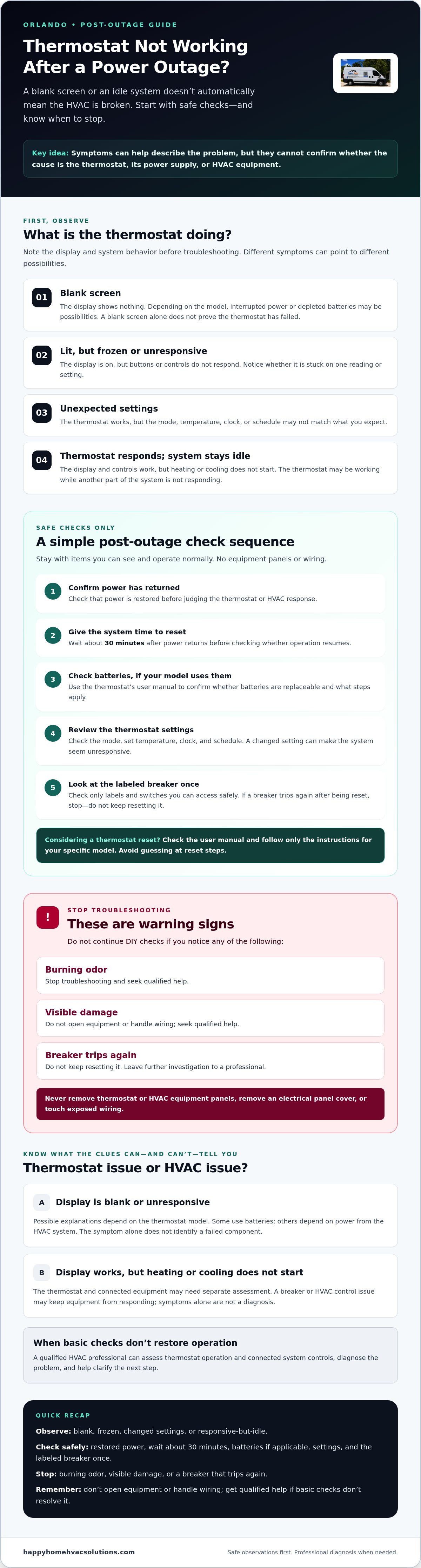
Work through these checks in order, and stop if you encounter a safety warning. For a thermostat not working after power outage Orlando homeowners can begin with visible settings and use the equipment manual for model-specific instructions. Don’t open the thermostat or HVAC equipment, remove an electrical panel cover, or touch wiring.
A safe step-by-step troubleshooting sequence
- Observe the thermostat and system. Note whether the display is blank, frozen, or responsive. Listen for unusual sounds from the equipment without opening or handling it.
- Review the settings. Check the mode, set temperature, schedule, and clock. Confirm they match your intended heating or cooling operation.
- Check batteries if applicable. Follow the thermostat manufacturer’s instructions to check or replace batteries, or restart the device. Don’t guess at reset steps or use a wait time that isn’t supported by the manual.
- Look at the labeled breaker once. If it’s clearly identified and safe to access, check whether it appears tripped. Don’t repeatedly reset it or remove the panel cover.
Stop troubleshooting if you notice a burning odor or visible damage, or if the breaker trips again. Leave further investigation to a qualified professional.
Prepare for a useful HVAC service call
If the system still won’t run, a few details can help explain what happened. Write down when the outage occurred, what the thermostat display shows, whether you hear anything from the equipment, and which checks you’ve already tried. If the make and model are visible without removing the thermostat from the wall, record those too.
Be specific about whether cooling, heating, or both are affected. This helps an HVAC professional understand the symptoms and assess thermostat operation alongside connected system components. For nearby local context, see this Winter Park AC repair guide.
If safe checks haven’t restored operation, consider requesting AC or heating repair from a qualified HVAC professional. Sharing your notes can help make the diagnosis more focused, while the technician determines what the system needs.
When to Call an Orlando HVAC Professional About a Thermostat
Once you’ve checked the thermostat’s visible settings and followed its manufacturer guidance, further trial and error may not help. If the display remains blank, the thermostat won’t hold its settings, or it responds but the heating or cooling system stays inactive, professional diagnosis is a sensible next step. The same applies if a breaker trips again or you notice a burning smell or visible damage. Don’t keep testing equipment when warning signs appear.
A thermostat issue after an outage doesn’t automatically mean the thermostat itself needs replacement. The control may be working while a connected HVAC component isn’t responding, or the thermostat may not be communicating with the system as expected. An on-site assessment helps distinguish these possibilities before anyone recommends a specific repair.
What a technician may inspect
Depending on your symptoms and system setup, an HVAC technician may assess whether the thermostat has power, whether it’s sending the appropriate control signal, and how the connected equipment responds. The inspection may also include relevant HVAC controls and components. The exact checks depend on what you report and what the technician finds. No diagnosis or repair outcome can be confirmed before the system is evaluated.
Leave wiring, voltage testing, control boards, and equipment-panel inspection to a qualified professional. These aren’t safe next steps for a homeowner to attempt. A clear account of what happened can help the technician focus the assessment without you opening or handling equipment.
Getting local help without guesswork
When contacting an HVAC company, share your Orlando-area location and a brief symptom timeline. Include when power went out and returned, what the thermostat displays now, whether the system makes any sounds, and which safe checks you tried. If you can see the thermostat’s make and model without removing it, that detail may also be useful. Mention whether the issue affects cooling, heating, or both.
Happy Home HVAC Solutions is a family-owned, licensed HVAC company serving Orlando and nearby Central Florida communities, with AC and heating repair services. When you’re ready to discuss your situation, contact Happy Home HVAC Solutions about your HVAC issue. Share the symptoms you’ve observed so the team can discuss the appropriate next step. Check directly with the company about current service availability for your location.
Take the Safe Next Step Toward Restoring Comfort
After an outage, a blank screen or inactive HVAC system doesn’t automatically mean the thermostat has failed. Check visible settings and applicable batteries, and inspect the labeled breaker once if it’s safe to do so. Don’t open equipment or handle wiring. If the breaker trips again, you notice burning odors or visible damage, or basic checks don’t restore operation, stop and seek professional diagnosis.
If you’re dealing with a thermostat not working after power outage Orlando homeowners can help a technician understand the issue by noting what the display shows, which functions are affected, and what checks they’ve already tried. That information can help guide an assessment of the thermostat and connected HVAC controls without guessing at the cause.
Happy Home HVAC Solutions is a family-owned and operated, licensed HVAC company serving Central Florida, including AC and heating repair. For help discussing your HVAC system, contact Happy Home HVAC Solutions. A careful next step can put you on a clearer path back to comfort.
Frequently Asked Questions
Why is my thermostat blank after a power outage?
A blank display may mean the thermostat lost power, its batteries need attention, or a related circuit was interrupted. The likely cause depends on your thermostat and HVAC setup. Check the manual and any battery indicator, and inspect the labeled breaker only if it’s safe and accessible. Don’t open equipment or touch wiring. If the screen stays blank after these checks, arrange professional diagnosis.
Should I reset my thermostat after a power outage?
Check the thermostat manual before resetting it, because steps vary by model and a reset may erase schedules or other settings. First confirm the mode, set temperature, clock, and schedule. Follow only the manufacturer’s safe instructions, and don’t remove the thermostat or handle wires. If it remains unresponsive afterward, an HVAC professional can assess both the thermostat and the equipment it controls.
Can a power outage damage an HVAC thermostat?
An outage can interrupt power or affect thermostat settings, but that doesn’t automatically mean the thermostat is damaged. A blank display, changed schedule, or system that won’t respond can have several possible causes. Check the manual and visible settings first. If the issue continues, a technician can assess whether the thermostat, its power supply, or another connected HVAC component needs attention.
Why is my thermostat on but my AC will not start after an outage?
A lit display doesn’t confirm that the HVAC system is receiving or responding to the thermostat’s call. Check the cooling mode and set temperature, then inspect the appropriate labeled breaker once if it’s safe. Don’t repeatedly reset a breaker that trips. If the AC remains inactive, a breaker trips again, or you notice unusual electrical signs, stop troubleshooting and request professional HVAC diagnosis.
How long should I wait for my AC to restart after power returns?
Restart timing depends on the thermostat, HVAC system, and manufacturer instructions, so one wait time may not apply to every setup. Check the owner’s manual for a specified delay and confirm the thermostat settings. If the AC still doesn’t start after that period, or you notice unusual signs or another breaker trip, stop troubleshooting and contact an HVAC technician for guidance.
When should I call an HVAC technician in Orlando about a thermostat after an outage?
Contact an HVAC professional if safe checks don’t restore the display or system, the thermostat won’t hold settings, or the equipment stays inactive. Stop immediately for a burning smell, visible damage, or a breaker that trips again. Share when the outage happened, what the thermostat shows, and what you’ve checked. Happy Home HVAC Solutions serves Orlando and nearby Central Florida communities, including Oviedo, Winter Springs, Winter Park, and Altamonte Springs.


